| 10 handy jQuery mobile tips and snippets to get you started
1. A full basic page
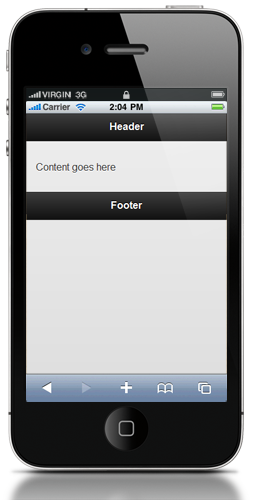
가장 기본이 되는 페이지의 full mark-up 입니다. 간단한 single page를 표현하시려면 여기 있는 코드가 가장 기본이 되는 겁니다.
<!DOCTYPE html>
<html>
<head>
<title>Page Title</title>
<link rel="stylesheet" href="http://code.jquery.com/mobile/1.0a3/jquery.mobile-1.0a3.min.css"
/>
<script type="text/javascript" src="http://code.jquery.com/jquery-1.5.min.js"></script>
<script type="text/javascript" src="http://code.jquery.com/mobile/1.0a3/jquery.mobile-1.0a3.min.js"></script>
</head>
<body>
<div data-role="page" id="home">
<div data-role="header">
<h1>Header</h1>
</div>
<div data-role="content">
<p>Content goes here</p>
</div>
<div data-role="footer">
<h4>Footer</h4>
</div>
</div>
</body>
</html>
2. Where to add traditional jQuery calls


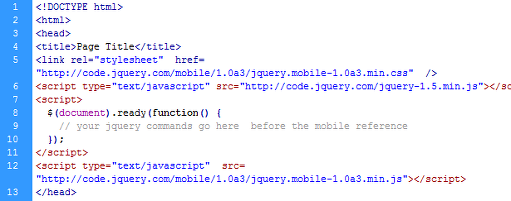
처음 시작할 때 모바일 플러그인이 trigger 되기 전에 뭔가 해야 되는게 있다는 걸 알게 됐습니다. 기본 jQuery 를 사용하고 싶었거든요.


그러면 모바일 plug-in을 참조하기 이전에 jQuery call을 넣어주시면 됩니다. 그러면 jQuery Mobile 보다 jQuery command가
먼저 실행이 되겠죠. 아래에 그 패턴이 있습니다.


<link rel="stylesheet" href="http://code.jquery.com/mobile/1.0a3/jquery.mobile-1.0a3.min.css"

/>

<script type="text/javascript" src="http://code.jquery.com/jquery-1.5.min.js"></script>


<script> $(document).ready(function() { // Your jQuery commands go here before the
mobile reference }); </script>

<script type="text/javascript" src="http://code.jquery.com/mobile/1.0a3/jquery.mobile-1.0a3.min.js"></script>
3. Disable AJAX navigation for all links at once


AJAX navigation은 아주 멋지죠. 그런데 가끔 이 기능을 disable 시킬 필요가 있을 때가 있어요. 이럴 때 AJAX navigation을
사용하지 말도록 할 수 가 있습니다.

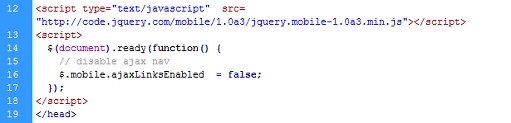
헤더부분에서 jQuery mobile library를 reference 한 후 에 아래 코딩을 추가해 보세요.

jQuery mobile library가 먼저 load 되 있어야 합니다. 그러니까 반드시 그 다음에 넣어야 합니다.

<script> $(document).ready(function() { // disable ajax nav $.mobile.ajaxLinksEnabled
= false; }); </script>
4. Stop some key items from being truncated
jQuery Mobile library의 기능 중 하나는 내용이 길면 알아서 UI element에 맞춰서 잘라준다는 겁니다.
그런데 두가지 경우에 이런 기능이 좀 불편해 질 때가 있더라구요. 첫번째는 full text를 보고 싶을 때구요. 두번째는 footer text
입니다. 이런것들에서 내용이 잘려서 "..."로 표시되면 좀 그렇죠.
이 두가지 경우에는 디폴트로 아래와 같은 CSS를 오버라이드 해 주세요.
For list items:
body .ui-li .ui-li-desc {
white-space: normal;
}
For footer content:
body .ui-footer .ui-title {
white-space: normal;
}
5. Use media queries to target devices
작업을 하면서 구현해야 할 것 중에 하나가 각 device 별로 어떻게 따로따로 CSS를 구현하느냐 입니다. 예를 들어 아이패드에서는 2개의 컬럼
레이아웃을 쓰고 싶고 스마트폰에서는 한개의 컬럼 레이아웃을 써야 할 때가 있잖아요.
이것을 구현하려면 media queries 를 사용하시면 됩니다.
이 미디어쿼리를 이용해서 각 스크린 사이즈 별 CSS를 구현하실 수 있습니다.
아래 링크를 보시면 두개의 아주 훌륭한 아티클이 있습니다. 참조하세요.
CSS Media Queries
and Using Available Space CSS-Tricks;
Hardboiled CSS3 Media Queries Stuff and Nonsense.
6. Target platforms with jQuery
특정 디바이스에 특정 CSS를 실행해야 할 때가 있죠. 그리고 오직 jQuery 만 사용해야 될 떄가 있습니다. 여기 some code from
Snipplr에서 가져온 코드가 있는데요. jQuery 로 유저 디바이스에 맞게 jQuery의 segment portion들을 쉽게 사용할 수
있도록 하는 방법입니다.
var deviceAgent = navigator.userAgent.toLowerCase();
var agentID = deviceAgent.match(/(iphone|ipod|ipad|android)/);
if(agentID.indexOf("iphone")>=0){
alert("iphone");
}
if(agentID.indexOf("ipod")>=0){
alert("ipod");
}
if(agentID.indexOf("ipad")>=0){
alert("ipad");
}
if(agentID.indexOf("android")>=0){
alert("android");
}
7. Use full paths for the targets of form action attributes
One quirk of the library seems to be its difficulty in finding target pages to post
forms to… that is, unless you use the full path from the root of the website.
For example, I’ve found that this form tag never finds its target:
<form action=" form-handler.php " method="get" >
Whereas a full path like this works as expected:
<form action="/current-directory/form-handler.php" method="get" >
Also, be sure that the results from the form handler produce a full, valid jQuery
mobile page, as shown in tip #1.
8. Create pop-up dialogs
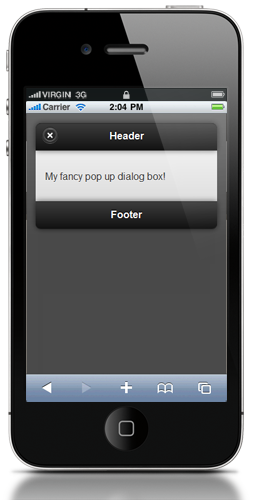
jQuery Mobile library의 좋은 기능 중 하나는 built-in pop-up하고 dialog box 기능이죠. 정말 간단하고 쉽게
이용할 수 있습니다. 기본적으로 data-rel="dialog" 를 붙여주면 됩니다.
두가지만 기억하세요. 첫번째로 target page는 반드시 full-blown jQuery mobile page라야 합니다.
두번째는 제대로 작동을 하도록 하려면은 full separate page라야 한다는 겁니다.
<a href="#pop.html" data-rel="dialog">Pop up!</a>
9. A “Cancel” + “Save” button combo
두개의 버튼을 나란히 넣어야 할 때가 있죠? 이럴 경우는 fieldset tag를 쓰시면 편리합니다.
그리고 두개의 버튼을 다른 theme으로 표현할 수도 있습니다.
이 코드는
여기에 있는겁니다. 자주 이용하기 때문에 저같은 경우는 따로 보관해 뒀다가 쓰고 있습니다.
<fieldset>

<div><button type="submit" data-theme="c">Cancel</button></div>

<div><button type="submit" data-theme="b">Submit</button></div>

</fieldset>

10. Create a column structure on your own
다양한 디바이스를 위한 single page structure에 대해 위에서 미디어 쿼리와 columns를 사용하는 방법을 위에서 알려 드렸죠.
다행히 웹 개발자들이 컬럼들을 어떻게 사용하는지에 대해 이전에 많이 만들어 놨었습니다. 이 기능들을 미디어쿼리와 같이 섞어쓰면 편하겠죠.
우리는 다양한 스크린사이즈에 맞게 다양한 structure를 쉽게 setup 할 수 있습니다.
Position Is Everything 은 이것을 하는데 가장 쉬운 방법을 알려 줍니다.
| 








 추천 :
추천 : 